
Short answer
The Strata naming standard in DNM leads every filename with the Division (the strata reference such as STRATA1234), then a YYYYMMDD date that sorts within matching Division prefixes, a short Type code, and a plain-words Description.
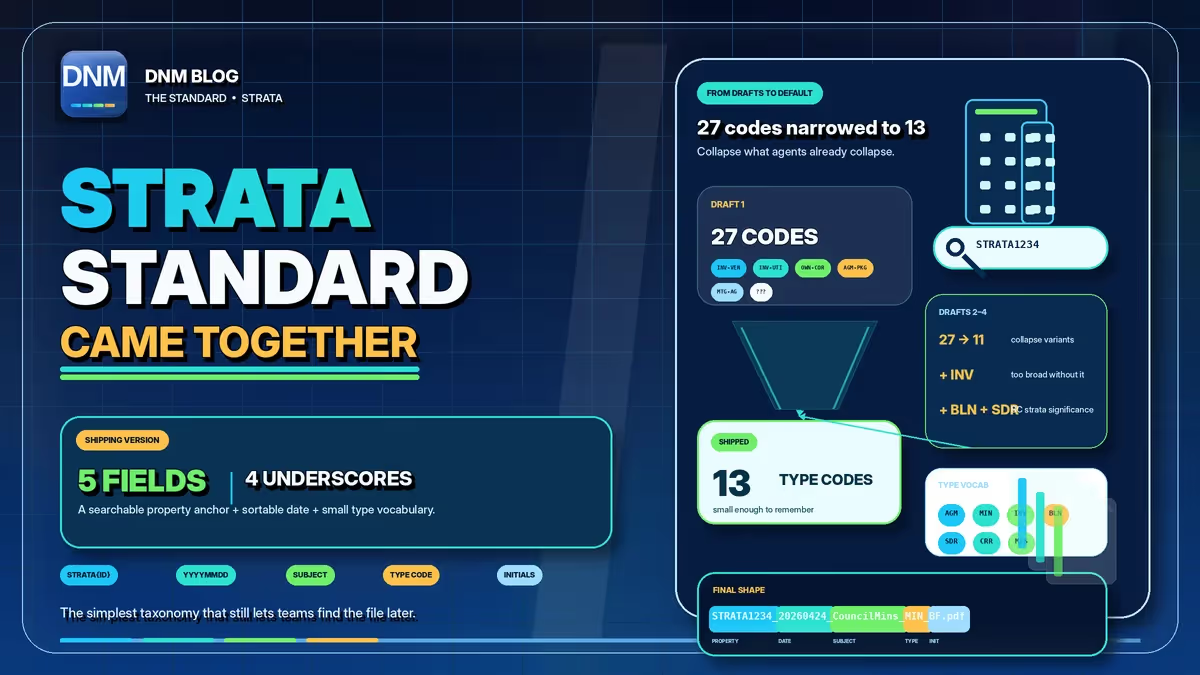
Those choices, a reliable handle first, a sortable date, and a small memorable vocabulary, provide a consistent way to identify strata records.
None of that was obvious at the start. The standard came out of watching real strata offices lose files in plain sight: a council member asks for everything on a building, and the search turns up some of it, scattered across folders named by whoever happened to save the document that week. Here's the reasoning behind the fields DNM uses to suggest names for imported files.
Why does the Division lead the filename?
A useful first segment is a stable reference that colleagues recognize. In the Strata standard that segment is the Division: the client, case, property, project, or claim a file belongs to. For a strata firm the natural Division is the strata reference, for example STRATA1234.
Notice that the word "strata" itself does almost no work here. Every file in the office is a strata file, so leading with the word would group everything and distinguish nothing. The reference number is what separates building 1234 from building 5678. A search for STRATA1234 can help locate names carrying that reference, subject to the search scope, index and permissions. The Division earns its place at the front because retrieval starts there.
Why is the date written YYYYMMDD?
Written as 20260424, the date looks colder than "April 24, 2026," and that is deliberate. A name that puts the year first, then month, then day sorts into correct chronological order as plain text, with no special handling. Sort by name and, within the same Division prefix and year, January dates appear before February dates.
File-system Created and Modified timestamps describe file operations, not necessarily the document's issue date. Copying may preserve some timestamps while other operations change them. A reviewed date in the filename makes the chosen document date explicit. This is also why universities and records offices recommend the same format: UBC's records management office advises building file names from elements like the date, subject, and document type so records stay findable and reliable over time. The result is a name-sorted sequence based on the dates you chose.
Why keep the list of Type codes short?
The Type vocabulary was the decision that took the most argument. The obvious instinct is to give every kind of document its own code, and a busy strata office handles a lot of kinds. The trouble is that a long list stops being a standard and becomes a lookup table, and a lookup table that people have to consult mid-task gets skipped. Codes nobody can recall from memory get used inconsistently, which defeats the purpose.
So the Strata standard keeps the set small and broad: INV for invoices, MAINT for maintenance records, LGL for legal documents, COR for correspondence, PHOTO for images. The fine detail goes into the Description instead. That's also why the Type code sits right after the date, ahead of the Description: the short code names the kind of document up front, so you can tell an invoice from a maintenance record at a glance without reading the whole name.
The Description that follows is plain words joined by hyphens (Roof-Leak-Assessment, AGM-Minutes, Vendor-Invoice), and it carries the specifics a code would otherwise have to invent. One COR code plus a clear Description beats three near-identical correspondence codes that nobody can keep straight. The working rule: use the smallest set of codes that still lets you find the right file months later, the same keep-it-short instinct that keeps whole names from sprawling.
What does a full Strata filename look like?
Put the pieces in order and a Strata name reads like this:
STRATA1234_20260424_MAINT_Roof-Leak-Assessment_001.pdf
Division, then the sortable date, then a short Type code, then a plain-words Description, then an optional sequence number, then the original extension. Along the way DNM strips or replaces the characters that Windows and SharePoint reject (colons, question marks, asterisks, slashes), to help catch common naming restrictions before saving. Check the complete destination path too. Suggestions use local rules without uploading documents to a naming service; saved fields and current batch inputs, including sequence numbers, determine the result.
Try the Strata standard yourself
You can read the pattern field by field on the DNM Standard page, and build a name to your own conventions with the naming convention generator. When you're ready to review imported files against your saved standard, download DNM and start the free 14-day trial, no card required. For a wider look at how the pieces fit together, see how to name files.
Related reading
- Why YYYYMMDD is the date format filenames need
- The 12-character rule for file names that scale
- Why your shared drive is impossible to search
- Why we built DNM before EMP
- Free naming convention generator
- The DNM file naming standard
Common questions
Why does the Strata standard start with the Division?
It gives each name a property reference such as STRATA1234. Matching references group together when sorting by name.
Does the Type field group all invoices across every date?
No. In the Strata standard the date precedes Type, so type grouping occurs only after the Division and date match.