
Short answer
Review names before migration, but check the whole destination path as well. DNM can flag common naming issues locally and suggest structured names for you to review. Passing its checks is not a guarantee of successful Microsoft 365 sync.
Why check before migration?
Local applications, sync clients and cloud services do not all handle names and paths in the same way. Files collected from several systems may include names that need attention before upload. Windows already rejects many reserved characters and device names; those restrictions are not unique to Microsoft 365.
Reviewing a sample before the move gives you a chance to choose meaningful replacements, check references and test the destination without committing the entire collection.
Start with Microsoft's restrictions
Use Microsoft's OneDrive and SharePoint restrictions as the source for current character, reserved-name and file-type rules. Check folder names as well as filenames. Organization settings and the applications used to open files can add constraints.
Do not assume that removing punctuation is enough. A valid filename can still have a destination path that is too long. The path-length guide explains the cloud and local budgets.
A structured name you can read outside its folder
The Strata standard provides this kind of pattern:
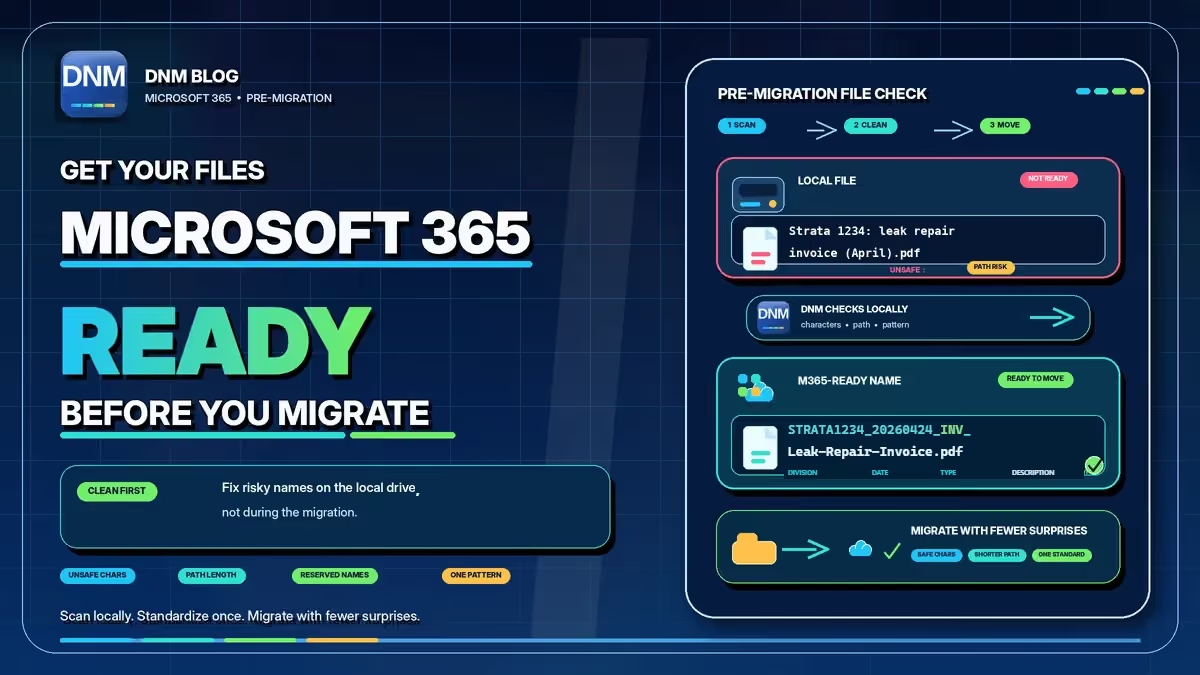
STRATA1234_20260424_INV_ABC-Plumbing-Leak-Repair.pdf
- STRATA1234 identifies the property or Division.
- 20260424 is the chosen document date in YYYYMMDD form.
- INV identifies an invoice in this standard.
- ABC-Plumbing-Leak-Repair describes the document.
- .pdf remains the original file extension.
With name sorting, matching Division prefixes group together, then dates order those files. The type groups files only after preceding fields match. It does not place every invoice together across all dates.
Different DNM standards use different field orders. Start with the standard reference, or preview your own values in the naming convention generator.
One example, with the inputs made explicit
Suppose a PDF arrives as leak repair invoice (April).pdf. After checking that it belongs to Strata 1234 and is dated April 24, 2026, you could name it STRATA1234_20260424_INV_Leak-Repair-Invoice.pdf.
The new name records information you verified. It does not convert the file, prove the invoice is accurate or guarantee that it fits every future folder. A name containing a colon would need correction before normal Windows use too, not just before migration.
Review in DNM, then test the move
Import files into DNM, choose the relevant standard and check the suggestions. Review the document date, Division, description and output path before saving. Share a policy with colleagues if you want the same configuration, and confirm it is set up on each PC.
DNM checks and names documents locally. It does not migrate them, control other Windows Save dialogs or impose a naming rule on files that never enter the app. Keep a recoverable copy before a bulk change, then test the files in the intended Microsoft 365 destination.
Common questions
Is DNM's Microsoft 365 check a guarantee?
No. It checks common restrictions against the supplied name and path. It is not Microsoft certification and does not replace a test migration.
Can a valid filename still have a path problem?
Yes. Parent folders, the destination library and the local sync root also consume path length. Check the complete destination, not just the filename.
Will a naming convention prevent all future naming mistakes?
No. A convention helps make names repeatable, but people still need to provide correct inputs and use the agreed review workflow.